
> Using the Different Features (Using the App) > Phone operation
Phone operation
Identify the L and R sides of the earphones and put them on correctly. Wearing
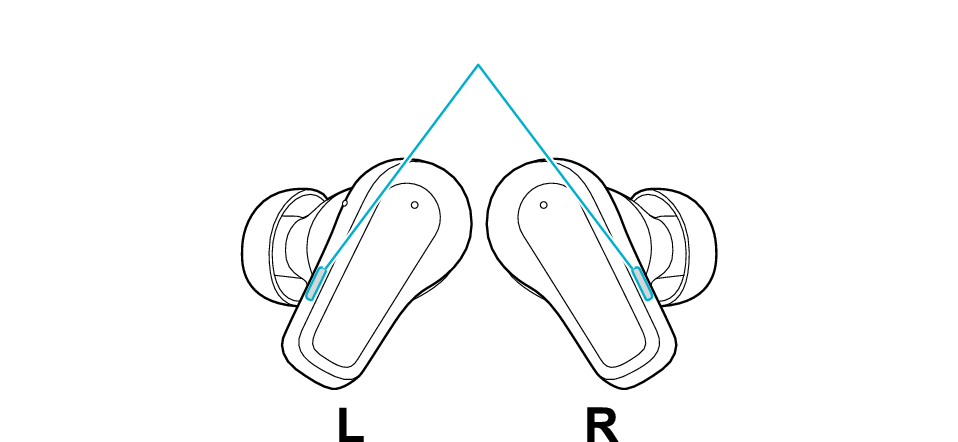
Button

Microphone positions
Answering the call
Press the L button once quickly when receiving the call.
Ending the call
During a call, press and hold the L button for about 1 second and release your finger when a beep is heard.
Rejecting a call
During an incoming call, press and hold the L button for about 1 second and release your finger when a beep is heard.
Muting/unmuting the microphone temporarily during a call
Press the L button quickly 1 times during the call. (Press it again quickly to return to normal)
This is a function that mutes the microphone so that the other party cannot hear your voice. However, you can still hear the other party.
You will hear an audio guidance when the function is turned on/off.
When switching sidetone mode to on/off
Press the L button quickly 4 times during the call.
It is a feature that picks up your own voice and ambient sounds during a call, allowing you to make calls in a manner that is close to normal conversations.
You will hear an audio guidance when the function is turned on/off.
Switching between the earphones and the smartphone during a call
Press the L button quickly 5 times during the call.
Using voice assistant function (Siri etc)
Press the L button quickly 4 times when not using the phone function.
Using the noise canceling/ambient sound function
Press the button on the R earphone once quickly.
Each quick press will change the function as follows.

Noise canceling function
Ambient sound function
You will hear an audio guidance when the function is switched.
The noise canceling function is set to on when purchased.
Selected function can be switched by changing the setting of “Switching settings for control keys” in the app. You can choose an option from noise canceling, wind cut, ambient sound and off.
Using the noise canceling function mainly helps to reduce ambient noises such as noise in a vehicle and noise from air conditioners in a room.
Using the ambient sound function allows you to hear your surrounding sounds.
Switching on/off the Touch & Talk function
Press and hold the R button for about 1 second and release your finger when a beep is heard.
When using the Touch & Talk function, the built-in microphone picks up external sounds and plays them through the earphones, making it easier to hear the surrounding sounds.
Some button operations may not work in the phone calling app.
When using both earphones to make a hands-free call, you can toggle on/off the noise canceling function, ambient sound function and Touch & Talk function. Listening to music
By using the app, you can enable Adaptive Mode, which automatically optimizes the noise-canceling effect according to the surrounding noise level.
We do not guarantee all operations of the BLUETOOTH device.
Check whether it is the L or R earphone, and fit it correctly to the ear. Wearing
The L earphone is used in the illustration.

Button

Microphone positions
Answering the call
Press button once quickly when receiving the call.
Ending the call
During a call, press and hold the button for about 1 second and release your finger when a beep is heard.
Rejecting a call
During an incoming call, press and hold the button for about 1 second and release your finger when a beep is heard.
Muting/unmuting the microphone temporarily during a call
Press the button once quickly during the call. (Press it again quickly to return to normal)
This is a function that mutes the microphone so that the other party cannot hear your voice. However, you can still hear the other party.
You will hear an audio guidance when the function is turned on/off.
When switching sidetone mode to on/off
Press the button 4 times quickly during the call.
It is a feature that picks up your own voice and ambient sounds during a call, allowing you to make calls in a manner that is close to normal conversations.
You will hear an audio guidance when the function is turned on/off.
Switching between the earphones and the smartphone during a call
Press the button 5 times quickly during the call.
Using voice assistant function (Siri etc)
Press the button 4 times quickly when not using the phone function.
Some button operations may not work in the phone calling app.
When using both earphones to make a hands-free call, you can toggle on/off the noise canceling function, ambient sound function and Touch & Talk function. Listening to music
We do not guarantee all operations of the BLUETOOTH device.