
> Using the Different Features (Using the App) > Listening to music
Listening to music
Identify the L and R sides of the earphones and put them on correctly.
There is a semicircle raised bump on the L (left) side.
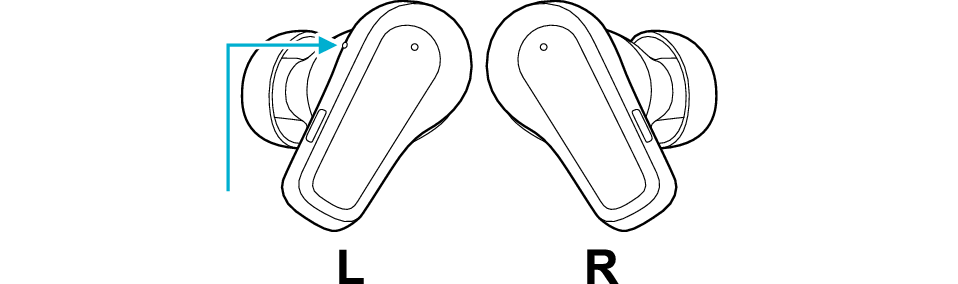
Left: Bump
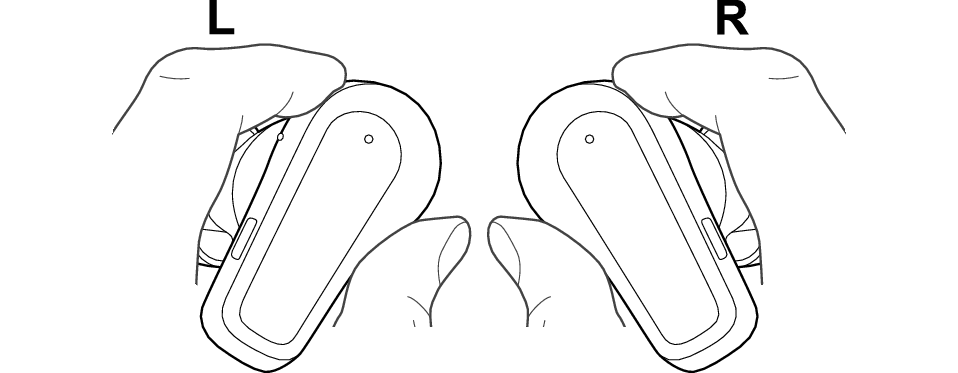
Hold the earphones as shown in the diagram and fit them into your ears.
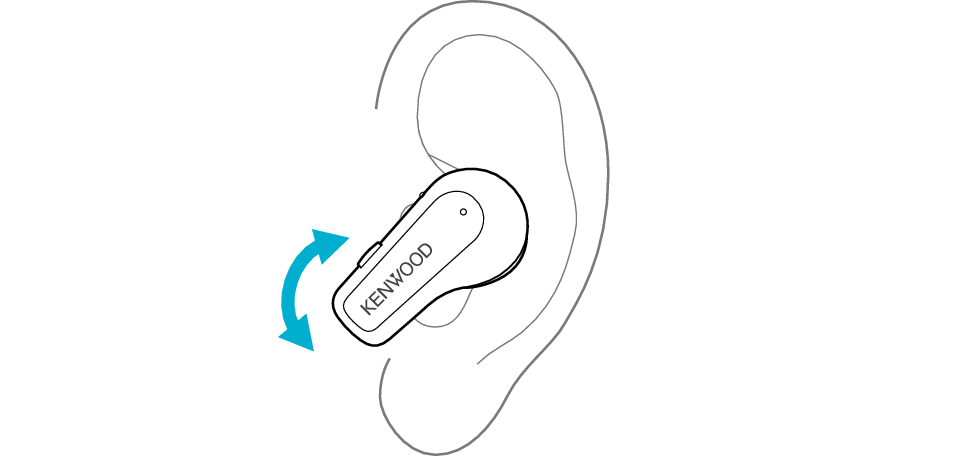
Rotate the earphones to adjust them to the most comfortable angle.
Adjusting the Ear Piece Position (Including Ear Piece Replacement)
-
Flip the earpieces as shown in the illustration below, and align the notch on the earpieces and convex shape on the earphones.
-
Flip back the earpieces as illustrated in the diagram.
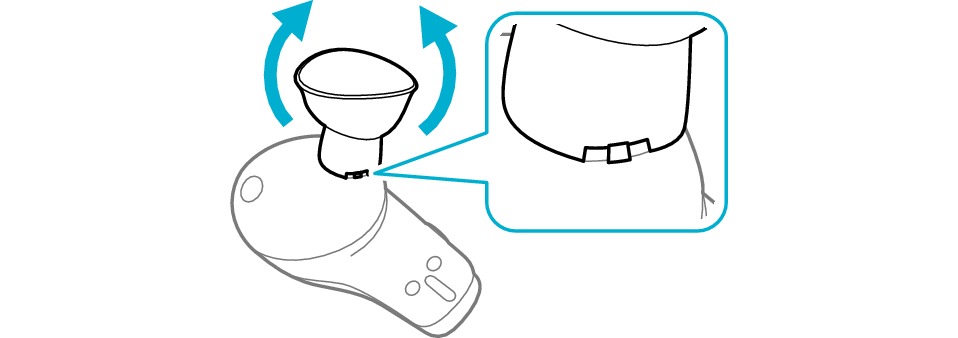

The medium-size silicone earpieces are attached when purchased.
To enjoy good sound quality, choose a set of earpieces with a size that fits snugly into your ears.
Using an earpiece that is not of the right size or not aligned properly can result in a lack of bass or reduction of the noise canceling effect.
Check that the earpiece is securely attached as shown in the figure.
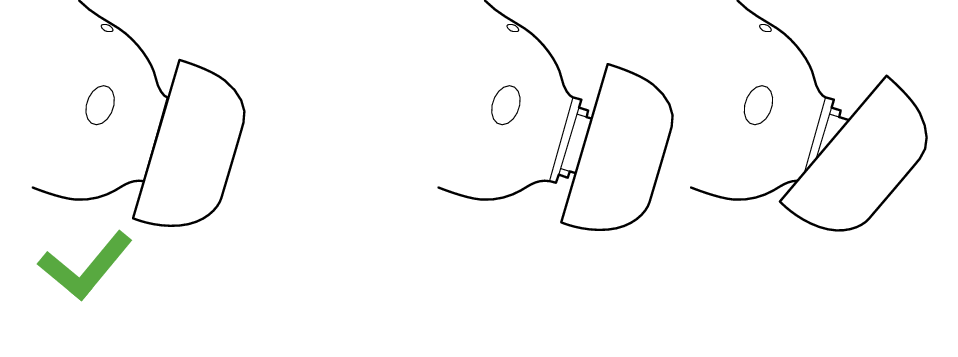
Correct
Wrong
If the earpiece is not securely attached, it may slipped off when in use and remain in your ear. If the earpiece remains in your ear, be careful not to push it further into your ear.
Launch the music player app on the BLUETOOTH device connected, to start playback.
1x
1x
2x
2x
3x
3x
4x
5x
1second
1second
Button
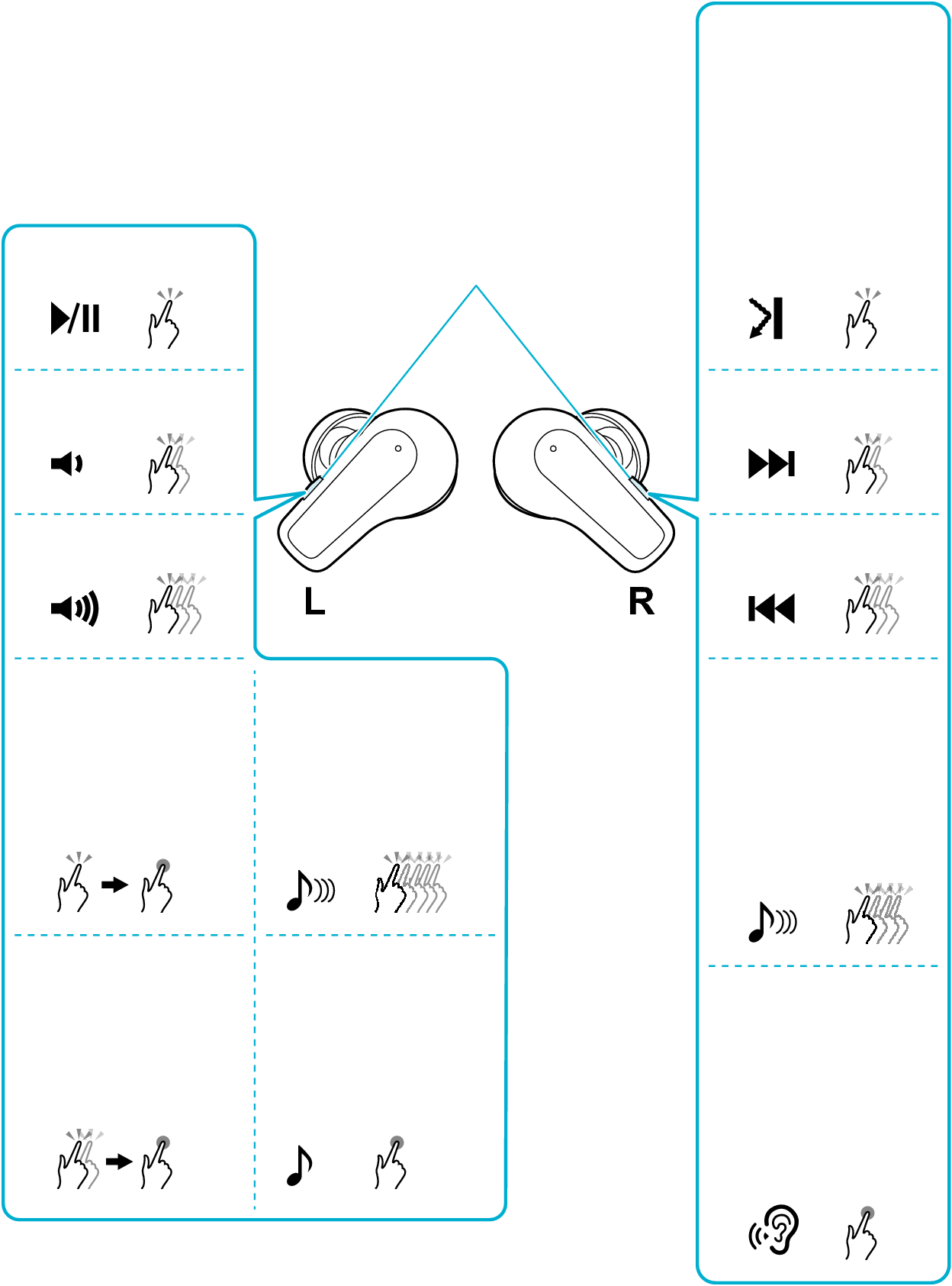
Switching between noise canceling/ambient sound functions (without lowering the music volume)
Switching the latency mode
Switching the sound mode
Switching on/off the spatial audio
Switching on/off the Touch & Talk function (lower the volume of the music)
Lowering the volume continuously
Raising the volume continuously
Press once, followed by pressing and holding
Press twice, followed by pressing and holding
Play/Pause ( )
)
Press the button on the L earphone once quickly.
Volume adjustment ( /
/ )
)
To raise the volume, press the button on the L earphone 3 times quickly during playback.
To lower the volume, press the button on the L earphone twice quickly during playback.
To continue raising the volume, press the button on the L earphone twice quickly, followed by pressing and holding.
To continue lowering the volume, press the button on the L earphone once quickly, followed by pressing and holding.
Skip to the next track ( )
)
Press the button on the R earphone twice quickly during playback.
Skip to the previous track or beginning of the current track ( )
)
Press the button on the R earphone 3 times quickly during playback.
Using the noise canceling/ambient sound function
Press the button on the R earphone once quickly.
Each quick press will change the function as follows.

Noise canceling function
Ambient sound function
You will hear an audio guidance when the function is switched.
The noise canceling function is set to on when purchased.
Selected function can be switched by changing the setting of “Switching settings for control keys” in the app. You can choose an option from noise canceling, wind cut, ambient sound and off.
Using the noise canceling function mainly helps to reduce ambient noises such as noise in a vehicle and noise from air conditioners in a room.
Using the ambient sound function allows you to hear your surrounding sounds.
Switching the sound mode
Press and hold the L button for about 1 second and release your finger when a beep is heard.
Each time you press the earphone for about 1 second and release your finger, the sound mode will switch as follows.

FLAT
BASS
CLEAR
DYNAMIC
VOCAL
You will hear an audio guidance when the function is switched.
Switching spatial audio to on/off
Press the button on the R earphone 4 times quickly.
This feature delivers natural, immersive and three-dimensional sound with a sense of depth.
Switching the latency mode
Press the button on the L earphone 5 times quickly.
When you feel that there is a time lag between the video images and audio sound while viewing a video, using the low latency mode can help to reduce the lag.
“Low Latency” can be heard from the audio guidance when you switch to the low latency mode. “Normal Latency” can be heard from the audio guidance when you switch to the standard mode.
Switching on/off the Touch & Talk function
Press and hold the R button for about 1 second and release your finger when a beep is heard.
When using the Touch & Talk function, the music playback volume is lowered, and the built-in microphone picks up external sounds and plays them through the earphones, making it easier to hear the surrounding sounds.
When you use the Touch & Talk function, the music will return to its original volume when the you wish to stop listening. If you have raised the volume while listening to surrounding sounds, take note that the volume will increase when you return to music playback.
The ambient sound function and the Touch & Talk function capture surrounding sound through the built-in microphone. When you touch the microphone hole, you can hear a noise. Take note not to touch or cover the microphone hole accidentally when operating the earphone.
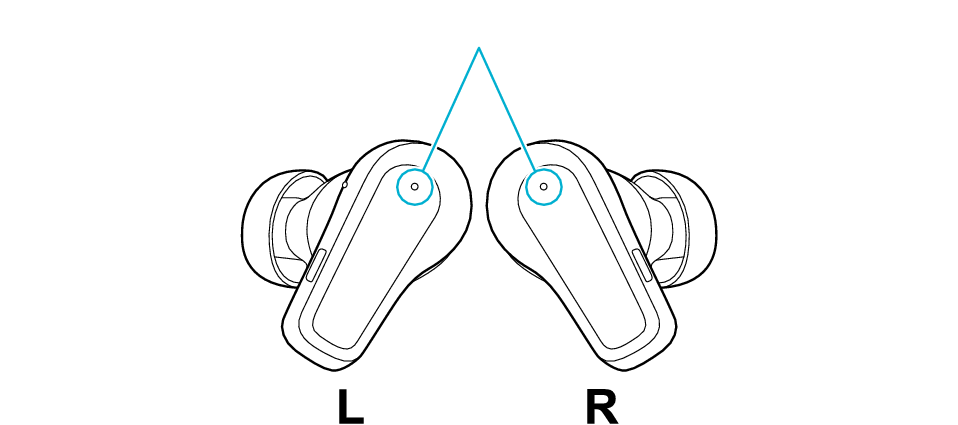
Microphone hole
Noise may occur if the earphones are placed in a charging case with no remaining battery while the ambient sound feature is on. Charge the charging case.
The noise canceling function is effective for low-pitched sounds such as noise in a vehicle and noise from air conditioners in a room but less effective for relatively high-pitched sounds such as announcements, conversations and bells in vehicles.
By using the app, you can enable Adaptive Mode, which automatically optimizes the noise-canceling effect according to the surrounding noise level.
The audio that is currently playing may be interrupted when you are using the low latency mode. By switching to “Stabilized Connection Mode” in the app, audio interruptions are less likely to occur.
When the remaining battery power becomes low, you will hear an audio guidance sound which informs you that the remaining battery level is low.
When the remaining battery power becomes low, the power will turn off automatically from the earphone that had ran out of battery.
When watching movies with the earphones, a slight time lag may occur in the audio output.
We do not guarantee all operations of the BLUETOOTH device.
Launch the music player app on the BLUETOOTH device connected, to start playback.
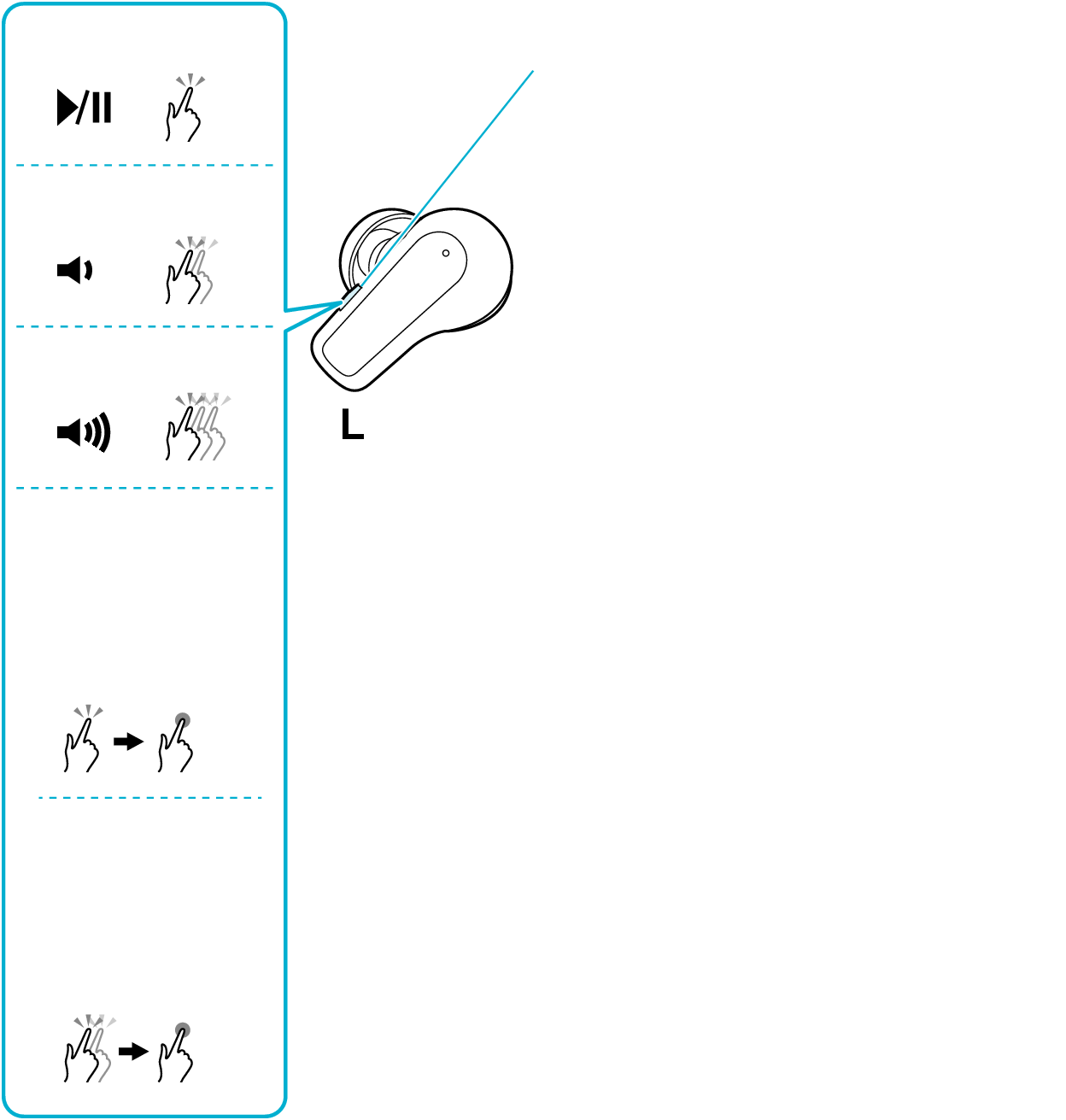
The L earphone is used in the illustration.
1x
2x
3x
Button
Lowering the volume continuously
Raising the volume continuously
Press once, followed by pressing and holding
Press twice, followed by pressing and holding
Play/Pause ()
Press the button button once quickly.
Volume adjustment (/)
To raise the volume, press the button 3 times quickly during playback.
To lower the volume, press the button twice quickly during playback.
To continue raising the volume, press the button quickly, followed by pressing and holding.
To continue lowering the volume, press the button once quickly, followed by pressing and holding.
When the remaining battery power becomes low, you will hear a notification via the audio guidance.
When the remaining battery power becomes low, the power will turn off automatically from the earphone.
When watching movies with the earphones, a slight time lag may occur in the audio output.
We do not guarantee all operations of the BLUETOOTH device.