Functions of the Remote control Buttons
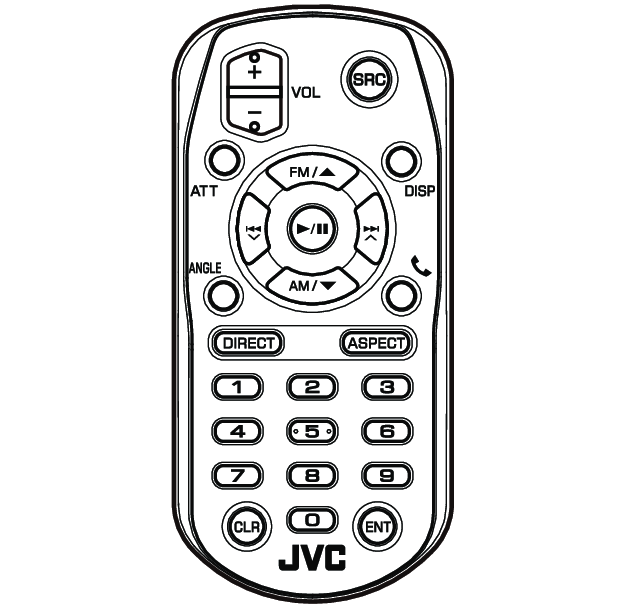
Key Name | Function |
|---|---|
SRC | Switches to the source to be played. In Hands-Free mode, hangs up the phone. |
VOL + - | Adjusts the volume. |
ATT | Lowers the volume when pressed once. Restores the previous volume when pressed twice. |
DISP | Switches the screen between the current source and the App screen from the connected iPhone or Android. |
FM/R AM/S | Selects the folder to be played. For the Radio source, selects FM/AM band to be received. |
E 2 F 3 | Selects the track or file to be played. For the Radio and Digital Radio sources, switches to broadcast stations received by the unit. |
K | Pauses the track or file, and resumes playing by pressing twice. For the Radio and Digital Radio sources, switches the seek mode. |
ANGLE | Not used. |
Û | When a call comes in, answers the call. |
DIRECT | Switches to the direct search mode. For details on the direct search mode, see Direct search mode. |
Numeric Keypad |
|
CLR | Deletes a character while in direct search mode. |
ENT | Performs the selected function. See Direct search mode. |